Skillful Line Work: Evaluating the Sketchbook Procreate Brushes Collection
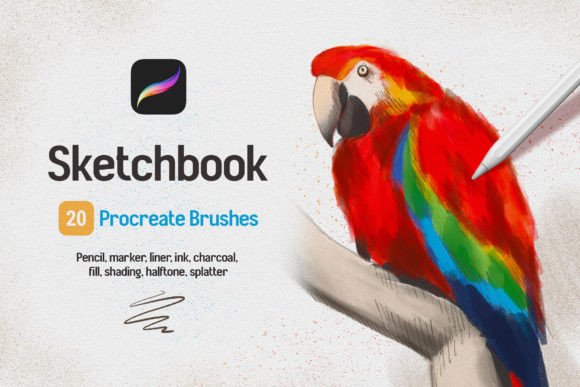
For digital artists transitioning from traditional media or those seeking to refine their workflow on the iPad, the choice of tools is as critical as the subject matter itself. The Sketchbook Procreate Brushes collection represents a specific approach to digital mark-making, prioritizing tactile responsiveness and a wide variety of textural outcomes. Unlike generic brush sets that often rely on simple shape repetition, this collection is engineered to mimic the physical behavior of real-world instruments. With 20 distinct pen pressure-sensitive brushes included in the set, it offers a comprehensive toolkit ranging from fine-line sketching to broad, expressive shading.
The core value proposition of these brushes lies in their sensitivity. They are designed to react dynamically to both pressure and tilt inputs from the Apple Pencil. This dual-sensitivity allows for precise control over line thickness and opacity, replicating the natural variation found when using charcoal, pencils, or markers on paper. For professionals and hobbyists alike, achieving this level of nuance is essential for creating artwork that feels organic rather than digitally sterile. When evaluating resources for your creative process, understanding how these specific attributes function can help determine if this set aligns with your artistic goals.
Understanding the Mechanics of Pressure and Tilt Sensitivity
A primary differentiator for the Sketchbook Procreate Brushes is the depth of their interaction with input devices. In many standard brush sets, pressure sensitivity is limited to changing the size of the stroke. However, this collection utilizes pressure to influence flow, opacity, and texture density simultaneously. When an artist applies light pressure, the result is a faint, airy line suitable for initial underdrawings. As pressure increases, the brush deposits more pigment, creating darker, denser strokes ideal for outlining or deep shadows.
Tilt sensitivity adds another layer of realism, particularly for brushes modeled after charcoal and pencil. By tilting the stylus, users can simulate the side-loading effect of a physical drawing tool, producing broader, softer strokes without needing to switch brushes. This capability is crucial for efficient shading techniques where rapid coverage is required. The integration of these mechanics ensures that the transition from sketch to fine detail remains fluid, allowing the artist to maintain momentum without constant menu navigation.
The Role of Realistic Paper Textures
Beyond the brush dynamics themselves, the accompanying canvas textures play a significant role in the user experience. The set includes realistic paper textures that interact with the brush strokes to create a lifelike look. Digital art often suffers from a "too clean" appearance, where lines are perfectly uniform and lack the subtle grain of physical paper. These textures introduce micro-irregularities that break up the smoothness of digital ink, giving the artwork an authentic, tactile quality. This feature is particularly beneficial for artists who prioritize the aesthetic of traditional sketchbooks but require the flexibility of a digital workflow.
Categorization and Versatility Within the Set
The Sketchbook Procreate Brushes collection is organized into logical categories, ensuring that users can find the right tool for any stage of the creative process. The set comprises 20 brushes in total, divided into specific functional groups:
- Sketch Brushes (3): Designed for loose, exploratory lines and quick ideation.
- Outline Brushes (3): Optimized for clean, consistent linework and defining forms.
- Marker Brushes (3): Mimicking the ink flow and edge characteristics of alcohol-based markers.
- Halftone Brushes (3): Providing dot patterns and cross-hatching effects for comic book styles or vintage aesthetics.
- Splatter Brushes (3): Adding chaotic, organic texture for backgrounds or dynamic accents.
- Pencil and Charcoal: Offering dry-media textures for shading and tonal work.
- Watercolor and Shading: Simulating wet-on-wet blending and soft gradients.
This diversity allows a single set to cover the entire pipeline from initial concept to final rendering. For instance, an illustrator might start with a loose sketch brush, move to an outline brush for definition, apply halftones for shading, and finish with splatter effects for atmosphere. This versatility reduces the need to download multiple disparate brush packs, streamlining the library management within Procreate.
Comparative Analysis: When to Choose This Set
While the Sketchbook Procreate Brushes offer a robust array of options, they are not universally the best fit for every artistic style. It is important to evaluate them against other available resources based on specific project requirements.
Best Fit Situations:
This collection excels for artists working in illustration, character design, and editorial sketching. The emphasis on line work and halftones makes it particularly suitable for comic art, graphic novels, and storyboard creation. If your workflow relies heavily on clean outlines and textured shading, these brushes provide a dedicated environment that supports those techniques without requiring extensive customization. The inclusion of marker and watercolor brushes also makes it a strong contender for mixed-media digital pieces.
Tradeoffs and Limitations:
Artists focusing on hyper-realism or photobashing may find the texture-heavy nature of these brushes less suitable. The pronounced paper grain and specific stroke behaviors are designed to evoke a hand-drawn feel, which can sometimes conflict with the smooth, airbrushed finishes required in product visualization or certain types of portrait work. Additionally, while the set is versatile, it does not replace the need for highly specialized brushes used in advanced 3D painting or complex environmental art.
Comparison with Alternatives:
Compared to free, community-made brush sets, the Sketchbook Procreate Brushes offer a higher degree of polish and consistency. Free brushes often suffer from inconsistent pressure curves or lack the sophisticated texture mapping found in paid collections. On the other end of the spectrum, some premium brush libraries focus on a single medium, such as oil painting or calligraphy. While those may offer deeper specialization, the Sketchbook set provides a broader generalist toolkit, making it a practical choice for artists who juggle multiple styles or are still refining their signature look.
Practical Implementation and Workflow Integration
Adopting a new brush set requires a brief adjustment period to understand the nuances of each tool. The installation process for the Sketchbook Procreate Brushes is straightforward, designed to integrate seamlessly into the existing Procreate ecosystem.
- Download: Transfer the .procreate file directly to your iPad's storage.
- Import: Tap the .brushset file. Procreate will automatically recognize the format and begin the import process.
- Verification: Once installed, the brushes will appear at the top of your brush list, ready for immediate use.
Once imported, it is advisable to test each category to understand its unique behavior. For example, experimenting with the marker brushes on a blank canvas can reveal how the ink flow reacts to speed versus pressure. Similarly, testing the halftone brushes at different opacities can help determine the best settings for creating depth without muddying the image. This hands-on evaluation is key to maximizing the potential of the set.
Decision Factors for the Modern Digital Artist
When deciding whether to incorporate the Sketchbook Procreate Brushes into your toolkit, consider the following factors:
- Workflow Efficiency: Do you frequently switch between sketching, inking, and shading? A unified set reduces friction.
- Style Alignment: Does your art benefit from visible texture and organic imperfections? If so, these brushes are a strong match.
- Learning Curve: Are you looking for intuitive tools that behave predictably? The pressure and tilt sensitivity here is calibrated for ease of use.
- File Management: Do you prefer having fewer, high-quality assets rather than dozens of scattered free downloads?
Ultimately, the decision rests on how well the tool supports your creative intent. The Sketchbook Procreate Brushes are not merely a collection of shapes; they are a system designed to bridge the gap between digital convenience and traditional expressiveness. For artists aged 20 to 50 who are serious about refining their craft, investing time in mastering these tools can lead to more confident line work and richer visual storytelling. Whether you are creating detailed illustrations or quick conceptual sketches, the ability to control line weight and texture with precision is a fundamental advantage that this set aims to deliver.