Tie Dye Procreate Brushes V.2: A Practical Evaluation for Digital Artists
Digital illustration has evolved significantly, moving beyond flat vectors and clean lines to embrace textures that mimic the physical world. For artists working on the iPad with Procreate, achieving a convincing tie-dye aesthetic can be a time-consuming process involving complex layering, manual blending, and opacity adjustments. The Tie Dye Procreate Brushes V.2 set addresses this specific workflow challenge by offering a collection of 54 pre-configured brush stamps designed to replicate the organic flow of dyed fabric. This resource is not merely a decorative add-on; it represents a shift in how digital creators approach texture generation, balancing efficiency with artistic control.
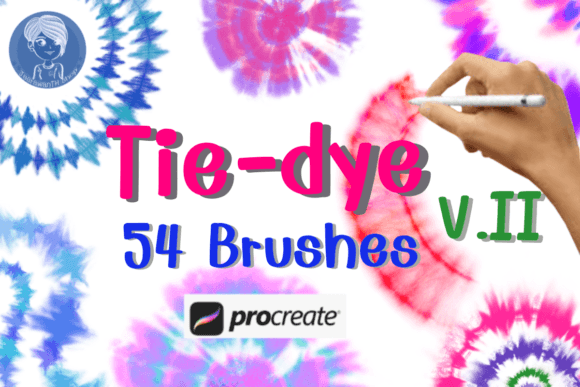
Understanding the utility of these tools requires looking at what they actually contain and how they function within the software ecosystem. The package includes two distinct collections: the core V.2 set and an additional "Set2" containing further variations. Together, they provide a comprehensive library of stamp brushes. Unlike standard airbrushes or soft round brushes that require significant hand movement to build up color gradients, these are stamp-based tools. A single tap deposits a pre-rendered pattern of swirling colors, mimicking the chemical reaction of dye soaking into cotton. This distinction is crucial for artists who need to populate large areas of a canvas quickly without sacrificing the chaotic, natural look of real tie-dye.
Defining the Distinctive Features of Tie Dye Procreate Brushes V.2
The primary value proposition of Tie Dye Procreate Brushes V.2 lies in its realism and variety. Creating a realistic tie-dye effect from scratch involves mastering wet media simulation, which can be technically demanding. These brushes bypass the learning curve associated with fluid dynamics while retaining the visual complexity of the medium. The 54 brush stamps included in the Zip file cover a wide spectrum of patterns, from tight spirals and crinkled folds to loose, washed-out gradients.
What sets this version apart is the refinement found in V.2 compared to earlier iterations or generic free alternatives. The developers have focused on edge definition and color blending within the stamp itself. In many lower-quality brush sets, the edges of the dye appear too sharp or pixelated, breaking the illusion of fabric. In contrast, the V.2 set utilizes anti-aliasing and subtle transparency variations that allow the stamped image to blend more naturally with underlying layers. This makes them particularly effective for projects requiring high-resolution output, such as packaging design or print-ready posters.
Furthermore, the inclusion of "Set2" expands the creative possibilities. While the main set focuses on classic tie-dye aesthetics, Set2 often introduces variations that might lean towards watercolor washes or distressed textures. This breadth allows an artist to maintain consistency across a project while introducing enough variation to avoid the repetitive look that plagues many stamp-based workflows. The ability to mix and match between the two sets provides a level of depth that single-brush solutions cannot offer.
Comparing Workflow Efficiency Against Manual Techniques
When evaluating whether to invest in a specialized brush set like Tie Dye Procreate Brushes V.2, it is essential to compare it against the alternative: creating the effect manually. The manual approach typically involves using the Liquify tool, Smudge tool, and multiple layers of low-opacity strokes. While this method offers total control over every pixel, it is incredibly labor-intensive. For a project requiring multiple tie-dye elements—such as a series of greeting cards or a clothing line mockup—the time difference is substantial.
Using the V.2 brushes transforms a task that might take hours into one that takes minutes. An artist can place a stamp, adjust the rotation, and tweak the size, instantly generating a unique pattern. This efficiency does not come at the cost of quality, provided the user understands how to manipulate the settings. However, there is a tradeoff. Relying heavily on stamps can sometimes lead to a "stamped" look if the same brush is used repeatedly without modification. To mitigate this, experienced users will vary the brush size, rotation, and opacity, or combine the stamps with manual blending to break up any visible repetition.
In comparison to other digital painting methods, such as using third-party texture overlays, the advantage of these Procreate-specific brushes is their integration. Texture overlays often sit on top of artwork, creating a flat appearance that can be difficult to integrate into complex compositions. Because the Tie Dye Procreate Brushes V.2 are native to the application, they interact correctly with Procreate's layer modes (like Multiply, Overlay, or Soft Light), allowing the dye to react realistically to the colors beneath them.
Strengths and Limitations in Professional Contexts
For professionals in branding and product design, the strengths of this tool are clear. The ability to rapidly prototype packaging designs with authentic-looking fabric textures can accelerate the client approval process. Similarly, illustrators creating assets for printing products benefit from the high resolution and clarity of the V.2 set. The brushes are optimized for screen-to-print workflows, ensuring that the vibrant colors and intricate swirls translate well when moved from the iPad to a printer.
However, limitations do exist. The most significant constraint is platform compatibility. As noted in the product description, these brushes were made specifically for Procreate and will not work with any other program. This exclusivity means that artists using Photoshop, Clip Studio Paint, or Krita cannot utilize this asset directly. They would need to find equivalent resources or recreate the effects manually. Additionally, while the brushes are powerful, they are not a substitute for understanding color theory. A poorly chosen color palette applied via these brushes will still result in a poor design. The tool facilitates execution, but it does not replace the need for artistic judgment.
Another consideration is the learning curve for optimal usage. While the brushes are easy to pick up, mastering them to create truly seamless fabric illusions requires practice. Users must learn how to layer different stamps, manage opacity levels, and use masking techniques to confine the dye to specific shapes. Without these skills, the results may appear disjointed or overly busy.
Decision Factors: When to Choose Tie Dye Procreate Brushes V.2
Determining if Tie Dye Procreate Brushes V.2 is the right choice depends largely on your specific project goals and workflow preferences. If you are an adult learner or professional aged 20–50 who values time efficiency and needs to produce high-quality textile simulations regularly, this set is a strong candidate. It is particularly well-suited for:
- Rapid Prototyping: Designers needing to visualize how tie-dye patterns look on various product mockups before committing to physical samples.
- Batch Production: Artists creating large volumes of similar items, such as a deck of greeting cards or a series of social media graphics, where consistency and speed are paramount.
- Texture Integration: Illustrators looking to add depth and tactile quality to digital paintings without leaving the Procreate environment.
Conversely, there are scenarios where this tool may not be the best fit. If your workflow relies on cross-platform compatibility, the restriction to Procreate alone is a dealbreaker. Similarly, if your artistic style demands hyper-realism where every fiber of the fabric must be individually rendered, a stamp-based approach might feel too generalized. In those cases, a combination of custom-made brushes and manual detailing might yield superior results, albeit at a higher time cost.
Furthermore, consider the nature of your final output. For small-scale prints or digital-only displays, the V.2 set is excellent. For massive billboards or ultra-high-definition textile manufacturing files, you should verify that the resolution of the stamps meets your specific DPI requirements. While the brushes are designed to be realistic, the inherent limits of a stamp file size can occasionally become apparent at extreme scales.
Practical Application and Best Practices
To get the most out of Tie Dye Procreate Brushes V.2, users should adopt a few practical strategies. First, treat the brushes as a starting point rather than a finished product. After placing a stamp, use the Smudge tool with a low-flow setting to soften harsh edges and blend the dye into adjacent areas. This hybrid approach combines the speed of the stamp with the nuance of manual painting.
Second, leverage the dual-set nature of the download. By alternating between the V.2 core brushes and Set2, you can create complex, multi-layered patterns that look less repetitive. Experiment with changing the color dynamically; since these are often alpha-lock friendly or responsive to Procreate's color dynamics, you can apply the same brush shape with entirely different color palettes to suit various branding needs.
Finally, remember that these tools are designed to save time so you can focus on creativity. Whether you are designing a brand identity, creating packaging for a new product line, or simply making beautiful posters for personal enjoyment, the goal is to streamline the tedious aspects of texture creation. The Tie Dye Procreate Brushes V.2 set serves this purpose effectively, provided it is used with intention and an understanding of its capabilities and constraints.
In conclusion, for Procreate users seeking to expand their textural vocabulary with realistic tie-dye effects, this brush set offers a compelling balance of speed and quality. It stands out among alternatives due to its specific optimization for the app and its comprehensive range of patterns. While it requires a commitment to the Procreate ecosystem, the return on investment in terms of workflow efficiency and visual fidelity makes it a valuable asset for both hobbyists and professionals alike.