Halftone Photoshop Brushes for Retro Design
There is a distinct texture to the past that modern digital art often struggles to replicate without looking flat or overly polished. The gritty, rhythmic patterns of vintage comic books, old newspaper prints, and mid-century advertising posters rely on a specific technique called halftoning. For designers working in Adobe Photoshop, recreating this look manually can be time-consuming and tedious. This is where Halftone Photoshop Brushes become an essential tool. These specialized assets allow artists to instantly apply complex dot, square, diamond, and wave patterns with a single stroke, bridging the gap between digital precision and analog nostalgia.
Understanding the Halftone Aesthetic
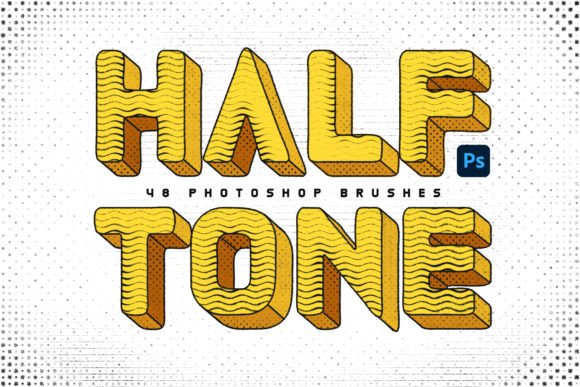
At its core, halftone is a printing technique that simulates continuous tone imagery through the use of dots, varying in size, shape, or spacing. In the digital realm, these brushes mimic that mechanical process. Instead of painting with solid color, you are laying down a pattern that creates the illusion of shading and depth. The set described here offers 48 meticulously calibrated brushes, covering a spectrum from traditional round dots to geometric squares, diamonds, chessboard layouts, lines, and waves.
This variety matters because different shapes evoke different eras and moods. Round dots are synonymous with classic pop art and comic books, while line screens might feel more like an old magazine illustration. Wave patterns can introduce a sense of motion or distortion, perfect for psychedelic or grunge aesthetics. By having these variations readily available, creators can experiment with visual language without needing to master complex filter stacks or vector generation tools.
Why Different Audiences Value These Tools
The utility of Halftone Photoshop Brushes extends far beyond a single type of user. What makes this resource valuable shifts depending on whether you are a hobbyist sketching for fun, a professional illustrator delivering a commercial project, or a small business owner building a brand identity.
For Beginners and Hobbyists, the primary barrier to entry in graphic design is often technical complexity. Learning how to create custom textures using filters, layer masks, and blend modes can be overwhelming. These brushes offer a shortcut that yields professional-looking results immediately. A beginner creating their first poster can select a "dot" brush, adjust the size slider, and instantly achieve a retro comic book background. It builds confidence by allowing them to focus on composition and color rather than getting bogged down in technical execution. The learning curve is gentle: load the .ABR file, pick a brush, and paint.
Experienced Illustrators and Graphic Designers have different priorities. They already know how to make textures; they need speed and consistency. In a professional workflow, time is currency. Manually generating a seamless halftone pattern for a large banner ad could take hours. With a library of 48 pre-made brushes, a professional can iterate quickly. They might test a "diamond" pattern against a "chess" pattern to see which one provides better contrast for a client's logo. The ability to toggle between opacity and blending modes allows for nuanced control over how the texture interacts with underlying layers, ensuring the final output meets high-end print or web standards.
Practical Applications Across Industries
The versatility of these brushes means they fit into various project types, each requiring a slightly different approach to usage.
- Poster and Event Design: Marketers and event organizers often lean into retro themes to stand out in a sea of minimalist designs. Using these brushes, they can create eye-catching backgrounds for concert flyers, festival banners, or album covers. The "wave" and "line" brushes are particularly effective here for adding dynamic movement to static text.
- Digital Art and Illustration: Digital painters often struggle to break away from the "smooth" look of standard soft brushes. Incorporating halftone patterns adds grit and character. An artist might use a low-opacity "square" brush to add shading to a character's clothing, giving it a printed fabric feel rather than a smooth gradient.
- Brand Identity and Packaging: Small business owners and entrepreneurs looking to establish a unique voice might use these textures to differentiate their packaging. A coffee shop with a vintage vibe could use a subtle dot pattern on their cup sleeves or website headers to reinforce their brand story without hiring a full-time designer.
- Educational Content: Educators teaching design history or print media can use these brushes as interactive tools. Instead of just showing slides about the history of printing, students can manipulate the brushes to understand how dot density affects perceived brightness and shadow.
Evaluating Quality and Workflow Integration
When considering whether to integrate Halftone Photoshop Brushes into your toolkit, several factors come into play beyond just the visual style. Reliability and ease of use are paramount. A good brush set should be compatible with the latest versions of Adobe Photoshop, loading seamlessly via the .ABR file format provided. The 48 brushes included in this collection are designed to work across various canvas sizes, maintaining their integrity whether you are designing a tiny icon or a massive billboard.
Flexibility is another key metric. These brushes are not static images; they are dynamic tools. Users can change the brush tip size to alter the scale of the pattern, adjust flow and opacity to control the intensity, and experiment with blending modes like "Multiply" or "Overlay" to integrate the texture naturally with other elements. This level of control ensures that the brushes serve the project, rather than forcing the project to conform to the brush.
Cost-effectiveness is also a significant consideration. While there are many free resources online, they often lack quality control, resulting in jagged edges or inconsistent patterns. Investing in a curated set ensures that every brush has been tested for optimal impact. For freelancers and agencies, the time saved by using high-quality assets translates directly into increased productivity and the ability to take on more projects.
Getting Started with Your Creative Projects
Integrating these tools into your workflow is straightforward. Once you download the package containing the .ABR file and JPG examples, simply open Photoshop and access the Brush Preset picker. Load the new file, and the 48 options will appear ready for use. Start by selecting a base layer and choosing a brush that matches your desired aesthetic. If you are aiming for a clean, modern pop-art look, the dot brushes are ideal. For something more abstract or textured, try the wave or chess patterns.
Don't be afraid to experiment. The true power of these Halftone Photoshop Brushes lies in how you combine them. You might use a large, low-opacity dot brush for a background wash and then switch to a smaller, high-contrast square brush for foreground details. The JPG examples included in the set serve as inspiration, showing real-world applications of how these textures can transform a flat image into something rich and dimensional.
Whether you are a student exploring new styles, a professional meeting a tight deadline, or a business owner crafting a memorable brand, these brushes offer a practical solution to a common design challenge. They provide the tactile feel of traditional print media within a digital environment, unlocking a world of creative possibilities at your fingertips. By mastering these tools, you gain the ability to infuse your work with depth, texture, and a timeless visual interest that resonates with audiences across all generations.