Impasto Photoshop Brushes: A Practical Evaluation
Digital painting has evolved significantly from flat, vector-like strokes to complex textures that mimic traditional media. Among the most sought-after effects is the impasto technique, characterized by thickly applied paint that stands out from the canvas. For digital artists using Adobe Photoshop, Impasto Photoshop Brushes serve as a critical tool for replicating this tactile quality on a screen. These specialized brushes are designed to simulate the physical buildup of paint, adding depth, dimension, and realism to digital compositions.
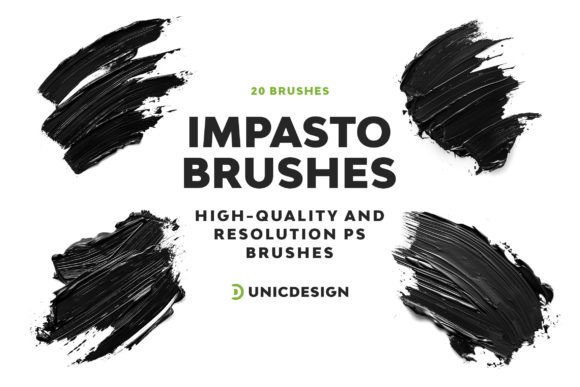
When evaluating a specific collection, such as a set containing 20 unique variations with high-resolution capabilities (up to 2000 px), it is essential to understand not just what the product offers, but how it fits into a broader workflow. This analysis explores the functionality, benefits, tradeoffs, and appropriate use cases for these tools to help you determine if they align with your artistic goals.
Understanding Impasto in Digital Workflows
In traditional art, impasto involves applying paint so thickly that brush or palette knife marks remain visible. This technique catches light and creates shadows within the stroke itself, giving the artwork a three-dimensional presence. In a digital environment, achieving this effect requires more than just a textured tip; it demands brushes that can manipulate opacity, flow, and shape dynamics to simulate volume.
Impasto Photoshop Brushes achieve this through complex settings within the brush engine. They often utilize dual brush shapes, texture overlays, and scatter properties to create the illusion of ridges and valleys. A high-quality set, like the one featuring 20 distinct variations, allows an artist to move beyond simple texture application and engage in a more nuanced layering process. The inclusion of hi-resolution assets ensures that even when zoomed in for fine detail work, the edges of the strokes remain crisp rather than pixelated.
Why Artists Seek High-Resolution Texture Brushes
The primary reason artists invest in specialized brush sets is the desire to bridge the gap between digital convenience and traditional aesthetics. Standard round or flat brushes in Photoshop often result in a "smooth" look that can feel sterile. By introducing the irregularity and depth of impasto, an artist can:
- Add Visual Depth: Thick strokes create natural shadows and highlights, making the image pop off the screen.
- Enhance Realism: For hyper-realistic portraits or landscapes, the subtle imperfections of a painted surface add credibility.
- Improve Workflow Efficiency: Instead of manually painting over areas to build up texture, a dedicated brush applies the effect instantly.
- Explore Style Versatility: Having 20 unique variations allows for experimentation with different stroke widths, angles, and densities without needing to adjust core settings constantly.
Furthermore, compatibility across software versions is a practical necessity. A robust brush pack should function seamlessly across a range of environments, from legacy versions like CS6 to modern iterations like CC 2022. This longevity ensures that the investment remains useful even as software updates occur.
Benefits and Expectations
Utilizing a curated set of Impasto Photoshop Brushes offers several tangible advantages. The most immediate benefit is the time saved in creating complex textures. Rather than spending hours masking and blending layers to simulate paint buildup, an artist can apply the desired effect with a single stroke.
High resolution is another key factor. Brushes defined at 2000 pixels ensure that the texture data is sufficient for large-format prints or high-DPI displays. Lower-resolution brushes may appear jagged or blurry when scaled up, which can detract from the professional quality of the final piece. Additionally, comprehensive documentation, such as a Readme file, streamlines the learning curve, allowing users to quickly understand installation and usage.
However, expectations must be managed. While these brushes provide the foundation for an impasto look, they do not replace artistic skill. The final result still depends on the user's understanding of color theory, lighting, and composition. The brush is a tool, not an automatic generator of masterpieces.
Tradeoffs and Considerations
Despite their utility, there are tradeoffs to consider when integrating third-party brush packs into a workflow. One significant consideration is file size. High-resolution brushes with complex dynamics can increase the overall size of the Photoshop document (.PSD). For artists working on systems with limited RAM or storage, loading a large number of these brushes simultaneously could impact performance.
Another factor is customization. Pre-made brushes are optimized for specific looks, which might limit flexibility if a project requires a highly unique texture. While many brushes allow for adjustments in the Brush Settings panel, some deep-seated parameters may be locked or difficult to modify without extensive knowledge of the brush engine.
Additionally, reliance on pre-set brushes can sometimes lead to a homogenized style. If many artists use the same popular brush packs, their work may begin to share similar textural characteristics. To maintain a unique voice, it is often beneficial to combine these tools with custom-created brushes or manual detailing.
Situations Where Impasto Brushes Are a Strong Fit
These brushes are particularly effective in scenarios where texture is a central element of the design. They are ideal for:
- Concept Art and Illustration: Creating atmospheric backgrounds or character designs that require a painterly feel.
- Digital Oil Painting Simulations: Projects specifically aiming to replicate the look of oil or acrylic canvases.
- Textured Graphic Design: Adding organic elements to posters, album covers, or marketing materials to break up clean vector lines.
- Restoration and Enhancement: Adding subtle texture to digital scans of traditional paintings to restore lost depth.
If your goal is to create work that feels tactile and rich, a set of 20 varied impasto brushes provides the necessary toolkit to explore different applications efficiently.
When Alternatives May Be Worth Considering
While Impasto Photoshop Brushes are powerful, they are not the solution for every project. Alternatives should be considered in the following situations:
- Minimalist or Vector-Based Designs: If the aesthetic requires clean lines and flat colors, adding heavy texture can clutter the composition and distract from the message.
- Photorealism Without Stylization: For pure photo manipulation where the goal is indistinguishable realism, heavy brush strokes may introduce unwanted artifacts.
- Performance Constraints: On older hardware, the computational load of rendering complex brush dynamics in real-time can cause lag, slowing down the creative process.
- Custom Textures Required: If a project demands a very specific, non-standard texture, it may be more efficient to create a custom brush from a scanned photograph rather than adapting a pre-made set.
Practical Decision-Making Insights
Before deciding to incorporate a new brush set into your workflow, evaluate your current needs against the features offered. Ask yourself if your current library lacks the variety needed for your upcoming projects. If you find yourself repeatedly trying to tweak standard brushes to get a thicker, more textured look, a dedicated impasto set could save significant time.
Consider the compatibility of the brushes with your specific version of Photoshop. While many modern brushes are backward compatible, it is prudent to verify that the files will load correctly in your environment, whether you are on CS6 or CC 2022. Checking for included documentation and support resources is also wise; having access to a Readme file and responsive support can resolve technical hurdles quickly.
Ultimately, the value of Impasto Photoshop Brushes lies in their ability to expand your creative vocabulary. They offer a pathway to richer, more dimensional artwork, provided they are used with intention and skill. By weighing the benefits of efficiency and texture against the potential tradeoffs of file size and stylistic uniformity, you can make an informed decision about whether these tools will enhance your artistic output.