Rose Stamp Procreate Brushes: A Practical Guide for Digital Artists
In the evolving landscape of digital illustration, efficiency often dictates the difference between a finished piece and an abandoned project. For artists working within the Procreate ecosystem on iPad, the ability to rapidly deploy complex textures is invaluable. The Rose Stamp Procreate Brushes set represents a specific category of tools designed to streamline this process. Unlike traditional brushes that require manual stroke manipulation to form a shape, these stamps apply a pre-rendered rose design with a single tap. This distinction makes them particularly useful for creating romantic designs, decorative borders, and patterned backgrounds without the time investment of painting each petal individually.
Understanding what these brushes offer requires looking beyond the marketing description. At their core, they are digital assets optimized for speed and consistency. However, like any specialized tool, they come with specific strengths, limitations, and tradeoffs compared to other methods of adding floral elements to artwork. This guide evaluates the utility of Rose Stamp Procreate Brushes, compares them to alternative workflows, and helps you determine if they fit your specific creative needs.
Understanding the Mechanics and Distinct Features
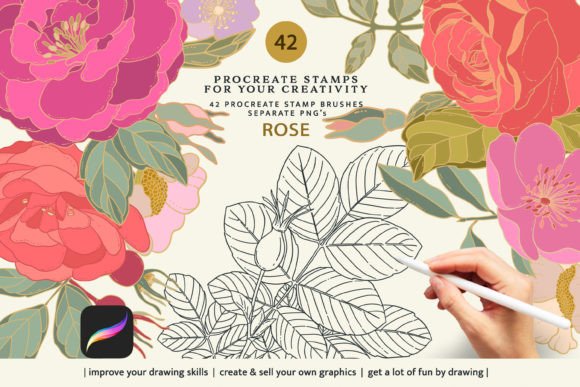
The primary function of the Rose Stamp Procreate Brushes is to act as a shortcut for detailed illustration. When an artist selects one of the 42 included stamps, the brush engine places a complete image of a rose onto the canvas instantly. This is fundamentally different from a textured brush that builds up an image through layering strokes. The distinct advantage here is uniformity; every stamp applied is identical in structure unless manually altered by the user.
What sets this particular set apart is its dual-format delivery. The package includes not only the 42 Procreate-compatible brush files but also 42 corresponding .png images with transparent backgrounds. This hybrid approach addresses a common pain point in digital asset management: flexibility. While the brushes are locked into the Procreate app environment, the PNG files allow the designs to be used in other contexts where the native brush format is unsupported. This ensures that even if an artist switches software or shares assets with collaborators using different platforms, the visual element remains accessible.
Customization is another critical factor. Once stamped, the rose elements can be adjusted in size, opacity, and color directly within Procreate. This allows for a degree of integration that static clip art often lacks. An artist can lower the opacity to create a watermark effect, resize the stamp to fit a corner motif, or change the hue to match a specific color palette. These capabilities transform a simple stamp into a versatile component of a larger composition.
Comparing Stamps vs. Hand-Painted Floral Brushes
When evaluating resources for adding roses to digital art, the most direct comparison is between stamp-based brushes and hand-painted or procedural floral brushes. Each approach serves a different artistic intent and workflow requirement.
Hand-Painted Brushes: Traditional floral brushes in Procreate mimic the texture of a paintbrush. They require the user to draw the shape of the rose, controlling pressure, tilt, and rotation to achieve the desired look. The benefit of this method is organic variation. No two roses painted will look exactly alike, which adds realism and a "human" touch to the artwork. However, this comes at the cost of time and skill. Achieving a consistent, high-quality rose repeatedly requires significant practice and patience.
Stamp Brushes (The Rose Stamp Set): In contrast, the Rose Stamp Procreate Brushes prioritize speed and precision. If a project requires ten identical roses arranged in a border, or if the artist needs to fill a large area with floral motifs quickly, stamps are superior. They eliminate the learning curve associated with rendering complex botanical details. The tradeoff is potential repetitiveness. If overused without variation in size, rotation, or blending, stamped elements can appear flat or artificial, lacking the subtle imperfections of a hand-drawn element.
The decision often depends on the final goal. For concept art, character design, or background generation where speed is paramount, the stamp approach is highly efficient. For fine art portraits or pieces requiring a painterly aesthetic, hand-painted brushes may yield more authentic results. Many professional artists adopt a hybrid strategy, using stamps to block out compositions and then refining them with custom brushes to break up the rigidity.
Evaluation of Workflow and Platform Limitations
A critical consideration when investing in digital assets is platform compatibility. The Rose Stamp Procreate Brushes are explicitly designed for the Procreate application on iPad. They rely on Procreate's specific brush engine to function correctly. It is important to note that these brush files will not work in Adobe Photoshop, Clip Studio Paint, or other desktop-based software. Attempting to import them into incompatible programs will result in errors or missing features.
This limitation narrows the target audience significantly. If your primary workflow involves desktop computers or industry-standard photo-editing suites, the brush component of this set offers no value. However, the inclusion of the 42 .png files mitigates this restriction. These image files serve as a universal alternative. Artists without Procreate, or those who need to incorporate these specific rose designs into a Photoshop document, can simply drag and drop the PNGs. While this loses the dynamic resizing and opacity control inherent to the live brush, it preserves the visual asset.
Furthermore, users should be aware that the colored variations of these roses are not included. The set provides the structural design, but the coloring must be handled by the artist. This is actually a strength for many professionals, as it prevents the colors from clashing with an existing palette. It forces the user to integrate the element into their specific color scheme, ensuring cohesion in the final piece.
Best-Fit Scenarios and Decision Factors
Determining whether the Rose Stamp Procreate Brushes are the right choice involves assessing your current projects and technical constraints. Here are the scenarios where this tool excels:
- Pattern Design and Textiles: Creating repeating patterns for fabric, wallpaper, or wrapping paper requires precise, consistent elements. The ability to stamp identical roses repeatedly makes this set ideal for generating seamless tiles.
- Social Media Graphics and Invitations: For designers creating wedding invitations, greeting cards, or social media posts with a romantic theme, speed is essential. These brushes allow for rapid decoration of layouts without compromising detail.
- Idea Generation and Sketching: During the brainstorming phase, artists often need to visualize how floral elements interact with text or other shapes. Using stamps allows for quick iteration and experimentation before committing to a final render.
- Beginner to Intermediate Artists: Those who want to include complex floral details but lack the advanced drawing skills to render them from scratch will find these brushes empowering. They provide a high-quality starting point that can be customized.
Conversely, there are situations where this tool may not be the optimal solution:
- Hyper-Realistic Botanical Illustration: If the goal is scientific accuracy or photorealism, pre-made stamps often lack the necessary nuance in lighting, shadow, and petal texture. Custom painting is usually required for this level of detail.
- Cross-Platform Teams: If you are working in a team where some members use Photoshop and others use Procreate, relying solely on the brush file creates friction. You would need to manage both the brush and PNG versions separately, which can complicate asset organization.
- Artists Seeking Organic Variation: If your style relies heavily on the unique imperfections of hand-drawn lines, the uniformity of a stamp might feel too rigid, even after customization.
Strategic Integration into Your Artwork
To maximize the value of the Rose Stamp Procreate Brushes, consider how you integrate them into your workflow. Rather than treating them as a standalone solution, view them as a foundational layer. Start by placing the stamps to establish composition and rhythm. Then, utilize Procreate's selection tools to distort, rotate, or blend the edges of the stamps. Adding noise, changing the blending mode to "Multiply" or "Overlay," or applying a slight blur can help the stamped elements merge seamlessly with hand-painted surroundings.
Additionally, leveraging the included PNG files can expand the utility of the purchase. You can use the PNGs in graphic design software to create mockups, printables, or assets for web development. This dual-use capability increases the return on investment, ensuring that the designs remain useful regardless of the software environment you find yourself in.
Ultimately, the decision to use Rose Stamp Procreate Brushes comes down to balancing efficiency with artistic intent. They are a powerful tool for adding romantic, detailed elements quickly, provided the user understands their limitations regarding platform compatibility and organic variation. By recognizing when to use stamps versus when to paint by hand, artists can maintain a flexible and productive workflow that supports both creativity and deadlines.