Gouache Procreate Brushes: A Practical Evaluation for Digital Artists
Digital illustration often struggles to replicate the tactile satisfaction of traditional media. While vector tools offer precision and watercolor brushes provide transparency, capturing the specific opacity and matte finish of gouache has historically required complex layering or custom brush creation. The Gouache Procreate Brushes kit addresses this gap by offering a curated collection of digital assets designed to mimic the behavior of real gouache paint within the Procreate environment. For professionals, educators, and serious hobbyists, this resource represents more than just a set of strokes; it is a workflow enhancer that bridges the divide between physical texture and digital efficiency.
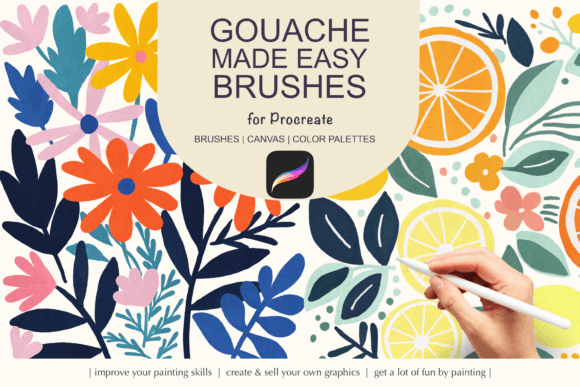
The value of a specialized brush set lies in its ability to reduce friction during the creative process. When an artist spends less time tweaking brush settings and more time executing their vision, productivity increases significantly. This particular kit is structured to provide immediate utility, combining 15 core gouache brushes with 20 stamp brushes, two textured paper backgrounds, and color palettes. This comprehensive approach suggests a focus on usability, ensuring that users have the necessary components to start painting without needing to source additional assets.
Understanding the Core Functionality
At its heart, the Gouache Procreate Brushes collection is engineered to simulate the unique properties of opaque water-based paint. Unlike transparent watercolors, gouache allows artists to paint light over dark, creating vibrant, flat areas of color that can be layered to build depth. The 15 primary brushes included in the .BRUSHSET file are calibrated to handle these interactions. They typically feature adjustable flow and opacity controls that react naturally to pressure sensitivity, a critical requirement for anyone using an Apple Pencil.
In real-world application, the difference between a standard round brush and a dedicated gouache brush becomes apparent when working on character design or concept art. The specialized brushes in this kit manage edge softness and pigment density effectively. When you apply a stroke, the digital tool mimics the way wet paint settles into the grain of paper, avoiding the "plastic" look that plagues many generic digital assets. This realism is essential for illustrators who need their work to feel grounded and tangible, whether for print publications, book covers, or high-resolution marketing materials.
The Role of Stamp Brushes and Texture
A significant component of this kit is the inclusion of 20 stamp brushes. In digital painting, stamp brushes serve as a powerful tool for adding organic variation quickly. Instead of manually painting every leaf, cloud, or speckle of dust, an artist can utilize these stamps to populate a scene with consistent yet varied elements. This is particularly useful for background artists and environmental designers who need to create lush, detailed worlds efficiently.
The integration of stamp brushes with the core gouache set creates a versatile toolkit. For instance, an illustrator might use a broad gouache brush to block in a sky and then switch to a stamp brush to add distant foliage or atmospheric particles. The consistency of the texture across both brush types ensures that the final image remains cohesive. Without this alignment, mixing different asset sources often results in visual dissonance where certain elements look out of place. The Gouache Procreate Brushes kit avoids this pitfall by maintaining a unified aesthetic language across all included files.
Workflow Integration and Technical Specifications
Beyond the brushes themselves, the inclusion of technical assets like paper textures and color swatches speaks to a well-thought-out user experience. The kit provides two gouache papers at 4763×3590px resolution with 300 DPI. This resolution is industry-standard for print production, making the assets suitable for professional deliverables such as posters, magazines, and large-format prints. Working on a canvas that already possesses the correct grain eliminates the need for post-processing adjustments to add texture, streamlining the rendering phase.
The two color palettes (.SWATCHES file) further enhance the workflow. Gouache painting often relies on limited, harmonious color schemes to maintain its characteristic matte and clean appearance. Having pre-configured swatches allows artists to experiment with color theory immediately, rather than spending hours mixing custom hex codes. This is a practical benefit for freelancers and entrepreneurs who operate under tight deadlines, as it accelerates the decision-making process regarding color selection.
It is important to note the technical requirements for utilizing these assets. The brushes function exclusively within the Procreate app on iPad devices running iOS updates compatible with Procreate version 5 or higher. They require an Apple Pencil to fully leverage pressure sensitivity features. Users attempting to import these files into other applications like Adobe Fresco or Clip Studio Paint will find them incompatible. This limitation narrows the audience but ensures a high degree of optimization for the intended platform. For those already invested in the Apple ecosystem, this specificity translates to reliability and performance stability.
Assessing Quality and Long-Term Value
When evaluating the long-term value of digital assets, consistency and flexibility are paramount. The Gouache Procreate Brushes demonstrate a strong commitment to quality through their responsiveness and adaptability. The brushes do not force a single style upon the user; instead, they provide a robust foundation that can be adjusted for various artistic directions. Whether an artist aims for a loose, sketchy style or a polished, finished illustration, the underlying engine of these brushes supports both approaches.
Reliability is another key factor. In a professional setting, software glitches or inconsistent brush behavior can disrupt a project timeline. These brushes appear to be optimized for the latest versions of Procreate, minimizing the risk of crashes or lag during intensive painting sessions. The separation of the brush sets into distinct .BRUSHSET files also aids in organization, allowing users to keep their workspace tidy and easily locate specific tools when needed.
However, potential users should consider their specific needs before committing. If an artist primarily works in vector graphics or requires highly realistic oil painting effects, this kit may not be the optimal choice. It is tailored specifically for those seeking the aesthetic of gouache. Additionally, while the provided paper textures are high quality, advanced users who prefer to create their own custom textures from scratch might find the included options somewhat limiting. Nevertheless, for the vast majority of illustrators, the convenience of having ready-to-use, high-resolution textures outweighs the desire for total customization.
Ideal Use Cases and Audience Fit
Who benefits most from this collection? The Gouache Procreate Brushes are particularly valuable for children's book illustrators, editorial artists, and social media creators who rely on a distinctive, hand-painted look. The matte finish and vibrant colors associated with gouache are staples in modern editorial design, making these tools highly relevant for magazine layouts and advertising campaigns. Educators teaching digital art can also utilize this kit to help students understand traditional painting techniques within a digital context, providing a safe and cost-effective way to experiment with opaque media.
For small business owners and marketers, the ability to produce high-quality, unique illustrations quickly is a competitive advantage. The efficiency gained from using pre-set palettes and stamp brushes allows for faster turnaround times on client projects. Furthermore, the professional presentation of the final artwork—thanks to the 300 DPI canvases—ensures that the output meets commercial printing standards without additional upscaling or processing.
Final Considerations for Implementation
Integrating the Gouache Procreate Brushes into your workflow is straightforward, provided the installation guidelines are followed. Ensuring that your iOS and Procreate app are updated prevents compatibility issues. Once installed, the brushes become part of your permanent library, available for future projects. The learning curve is minimal for experienced Procreate users, as the interface remains familiar, while the new tools expand creative possibilities.
In conclusion, this digital gouache kit offers a balanced combination of artistic fidelity and practical utility. It solves the common problem of achieving a traditional look in a digital medium without sacrificing speed or control. While it is not a universal solution for every type of digital art, for those aiming to master the gouache aesthetic on the iPad, it stands as a reliable and effective resource. By reducing technical barriers and enhancing creative flow, it empowers artists to focus on what matters most: the art itself.